Elite5Choice
Skinixtor
Skinixtor
Couldn't load pickup availability
Elevate Your Workspace With Skinixtor Portable Monitor
Experience professional-grade visuals anywhere with our ultra-slim, high-definition second screen that boosts productivity and enhances creativity for the modern professional on the move.
Transform Your Mobile Workstation Without Sacrificing Quality Or Space
Struggling With Limited Workspace?
Skinixtor’s ultra-slim profile allows you to carry professional-grade screen quality in your laptop bag. At just 0.3″ border, it fits alongside your laptop without adding bulk. The innovative magnetic stand provides versatile positioning options that adapt to confined workspaces.
Feeling Constrained By Your Device's Small Screen?
Experience exceptional clarity with our 2.5K resolution and 178° viewing angle. The IPS panel delivers consistent colors, making collaboration easier and reducing eye strain. With HDR rendering and 72% NTSC color gamut, your content appears vibrant even during extended use.
Dealing With Endless Adapter And Connection Problems?
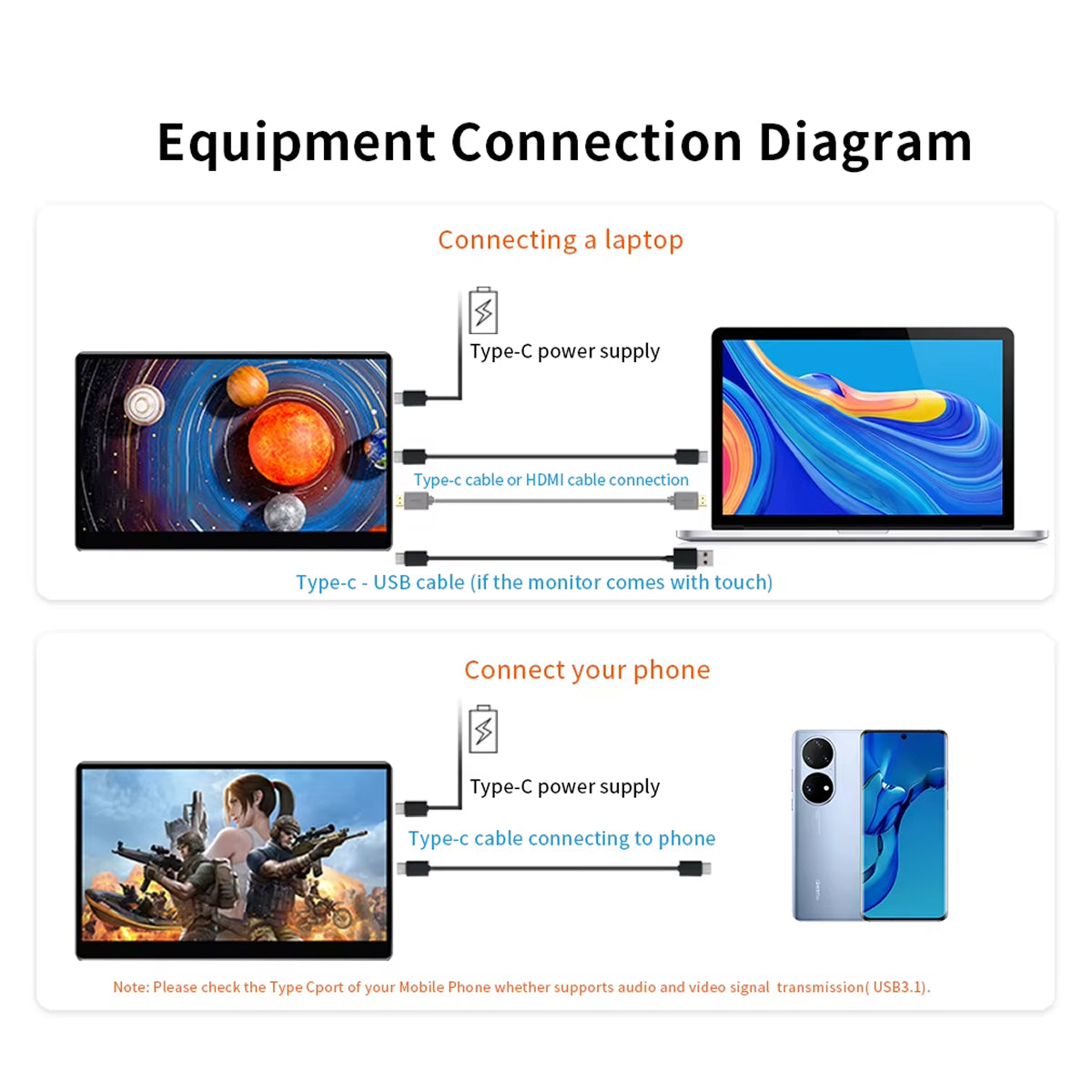
Connect seamlessly with a single USB-C cable that handles video, audio, AND power simultaneously. Compatible with virtually all devices from MacBooks to Windows laptops, smartphones, gaming consoles, and more without additional adapters. The intuitive plug-and-play functionality works instantly with multiple operating systems and device types for hassle-free setup.
Engineered For The Modern Professional's Workflow
Skinixtor combines cutting-edge display technology with practical portability features to deliver a truly professional second screen experience. The 2.5K resolution with 72% NTSC color gamut ensures your work looks its best, while the versatile magnetic stand adapts to any workspace setup.
- HDR Rendering For Vibrant Content
- Magnetic Stand For Multiple Positions
- Built-In Speakers For Clear Audio
- AMD FreeSync For Smooth Motion
Superior Visual
Enjoy exceptional clarity with 2.5K QHD resolution and 72% NTSC color gamut, ensuring your creative work maintains professional quality even away from your desk.
One-Cable Simplicity
Eliminate adapter chaos with our versatile USB-C connection that handles video, audio, and power simultaneously, streamlining your setup process no matter where you work.
Ultimate Versatility
Switch effortlessly between portrait and landscape orientations with our innovative magnetic bracket, adapting to any workspace or content type without additional accessories.
Professional Compatibility
Connect seamlessly to laptops, smartphones, tablets, and gaming consoles from all major brands, ensuring you’re never without a second screen regardless of your device ecosystem.
Travel-Friendly Design
Carry professional-grade screen quality in your laptop bag with our ultra-slim profile (0.3″ border) and lightweight construction designed specifically for the mobile professional.
Viewing Comfort
Protect your eyes during long work sessions with our anti-glare matte surface and 178° viewing angle that maintains consistent colors from any perspective.
MEET THE SKINIXTOR
Frequently Asked Questions
How do I connect the Skinixtor portable monitor to my laptop?
Use the included USB-C cable for video, audio, and power in one connection. For devices without USB-C, use Mini HDMI for video and USB for power.
Is the Skinixtor monitor compatible with MacBooks?
Yes! Works seamlessly with all MacBook models via USB-C, providing instant plug-and-play functionality without additional drivers.
Can I use this monitor with my smartphone or tablet?
Yes. Compatible with most smartphones and tablets including Apple, Samsung, Huawei, and Honor devices that support video output via USB-C.
Does this monitor work with gaming consoles?
Yes, works with PlayStation, Xbox, and Nintendo Switch via HDMI, delivering smooth gameplay with AMD FreeSync technology.
Can the Skinixtor monitor stand in both portrait and landscape modes?
Yes! Our magnetic bracket allows both vertical and horizontal positioning, giving you flexibility for different types of work.
What's the battery drain like when using this with a laptop?
Power draw is minimal at 8-10W when connected via USB-C, allowing extended work sessions without significantly impacting battery life.
How does the 2.5K resolution compare to standard 1080p monitors?
The 2.5K resolution provides 78% more pixels than 1080p, resulting in sharper text, more detailed images, and a more immersive experience.
Can I mount this monitor to a standard monitor arm?
Yes! Features VESA compatibility with standard 75x75mm mounting holes for attaching to monitor arms and stands.
Share