Elite5Choice
TabPenca
TabPenca
Couldn't load pickup availability
Unleash Your Creativity with the Professional TabPenca Tablet for Drawing with Pen
Looking for Precision in Every Stroke?
The TabPenca Tablet for Drawing with Pen offers 8192 levels of pressure sensitivity, ensuring every stroke is as precise as your hand movements. Whether you’re sketching, shading, or detailing, this tablet delivers the accuracy and control you need for professional-grade artwork.
Worried About Investing in the Wrong Equipment?
Our complete kit includes everything you need to start playing immediately, all meeting tournament standards. The carbon fiber construction and PP honeycomb core provide the perfect balance of power and control, ensuring you’re getting professional quality at a beginner-friendly price.
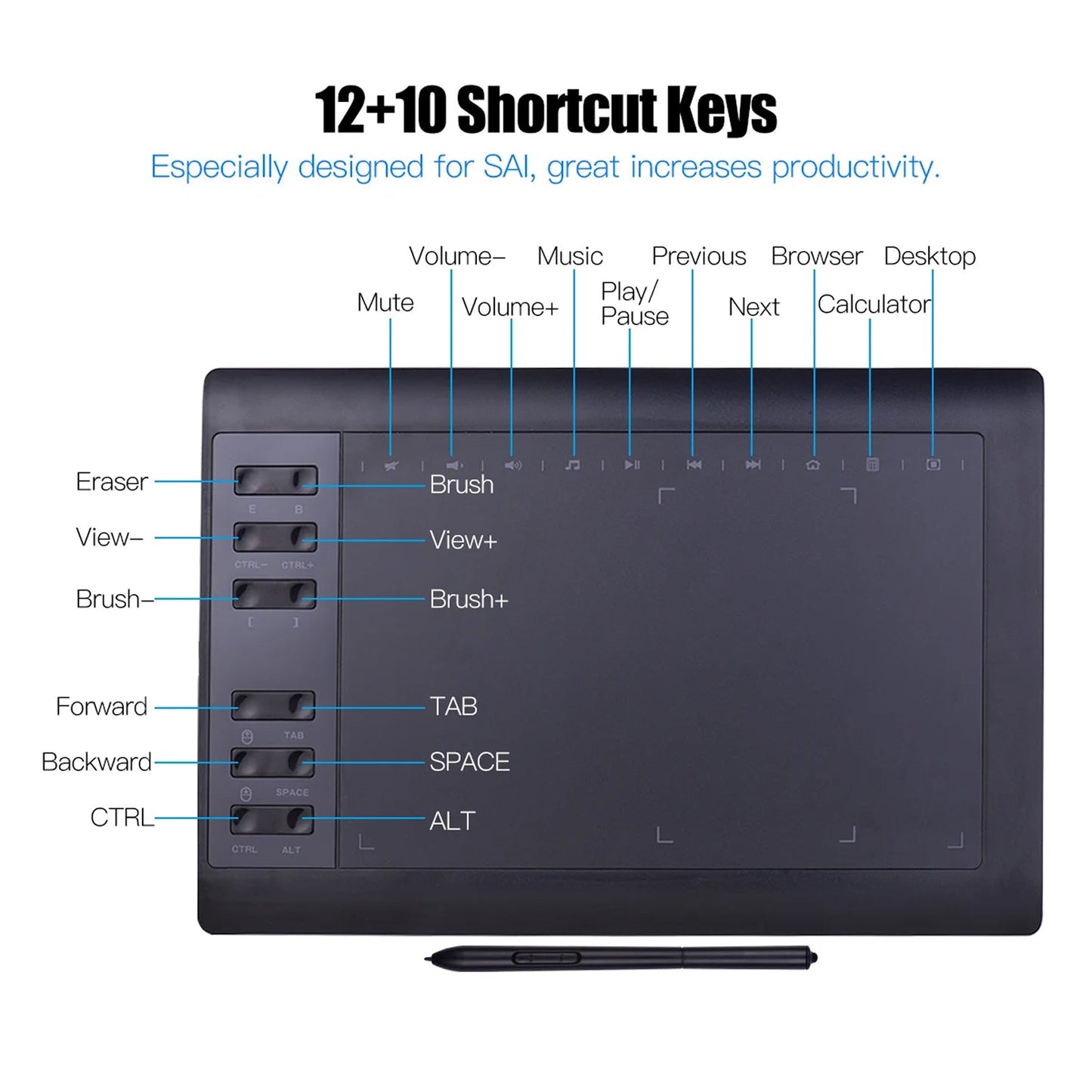
22 Customizable Shortcut Keys
The TabPenca Tablet is compatible with Windows, Mac OS X10.7-11 and above, Android 5.0 and above, and Linux4.4 and above. It works seamlessly with popular software like Adobe Photoshop, Illustrator, and more, making it a versatile tool for any creative professional.
Enhance Your Creative Process with the TabPenca Tablet for Drawing with Pen
The TabPenca Tablet is designed for ease of use and versatility, making it ideal for artists, designers, and educators. Its lightweight design and extensive compatibility ensure you can create anywhere, anytime, without compromising on performance.
- Battery-Free Stylus For Uninterrupted Use
- 60° Tilt Sensing For Natural Drawing
- 12+10 Shortcut Keys For Efficiency
-
Supports Multiple Design Software
PRECISION AND CONTROL
The TabPenca Tablet offers 8192 levels of pressure sensitivity, giving you unparalleled control over every stroke. This level of precision ensures your artwork is as detailed and expressive as you envision.
VERSATILE COMPATIBILITY
Compatible with Windows, Mac, Android, and Linux, the TabPenca Tablet works with a wide range of devices and software. Whether you’re at home or on the go, this tablet has you covered.
NATURAL DRAWING EXPERIENCE
The battery-free stylus and 60° tilt sensing provide a natural, hand-drawn feel. Experience the comfort and accuracy of traditional drawing with the convenience of digital tools.
SMOOTH PERFORMANCE
With a 233PPS report rate and 5080LPI resolution, the TabPenca Tablet delivers smooth, lag-free performance. Enjoy a seamless drawing experience that keeps up with your creative flow.
EFFICIENT WORKFLOW
22 customizable shortcut keys streamline your workflow, allowing you to focus on your art. Quickly access tools and functions without interrupting your creative process.
LIGHTWEIGHT AND PORTABLE
Weighing just 670g, the TabPenca Tablet is lightweight and portable. Take it anywhere and create whenever inspiration strikes, without the hassle of heavy equipment.
MEET THE TabPenca
Frequently Asked Questions
Yes, the TabPenca Tablet is compatible with Android 5.0 and above. Simply connect it to your device using the included USB cable or an OTG connector (not included).
Setting up the TabPenca Tablet is easy. Just connect it to your computer via USB, and the built-in driver will automatically install. No additional downloads or CDs are required.
Absolutely! The TabPenca Tablet is perfect for note-taking, document annotation, and formula writing. Its precision and responsiveness make it ideal for both creative and professional use.
The TabPenca Tablet works with a wide range of software, including Adobe Photoshop, Illustrator, Fireworks, Premiere, SAI, ZBrush, and more. It also supports Microsoft Office applications.
Yes, the TabPenca Tablet comes with a battery-free stylus that offers 8192 levels of pressure sensitivity and 60° tilt sensing for a natural drawing experience.
You can customize the shortcut keys using the included driver software. Simply open the settings, select the key you want to customize, and assign your preferred function.
Yes, the TabPenca Tablet is user-friendly and suitable for beginners. Its intuitive design and customizable features make it easy to learn and use, regardless of your skill level.
The TabPenca Tablet comes with a standard one-year warranty. Please refer to the manufacturer's website for detailed warranty information and support.
Share